
Download Screen Ruler 2D – Virtual Measuring Tool for Screen Precision
Overview
Screen Ruler 2D is a virtual measuring tool designed to simplify on-screen measurements for both professionals and everyday users. The app enables precise measurement of screen elements using a digital ruler that overlays directly on the display, eliminating the need for physical rulers or manual estimation. It is particularly useful in scenarios involving graphic design, UI/UX layout evaluation, document formatting, or any task requiring pixel-perfect alignment. The semi-transparent design ensures that underlying content remains visible, allowing users to measure without obstructing their view.
Target users include graphic designers, web developers, content creators, and anyone working with digital visuals who needs consistent and accurate measurements. The app addresses the common challenge of estimating distances or dimensions on screen, which can lead to inconsistencies in design and layout. By offering a lightweight, fast-access solution, Screen Ruler 2D enhances workflow efficiency and reduces errors in visual projects.
The developer did not provide additional technical details or company background, but the app has been available since 2016, indicating a stable presence in the digital productivity space. Its continued relevance suggests reliability and consistent performance over time. In the broader app ecosystem, it serves as a niche yet essential utility tool for users prioritizing precision in digital environments.
Key Features & Functionality
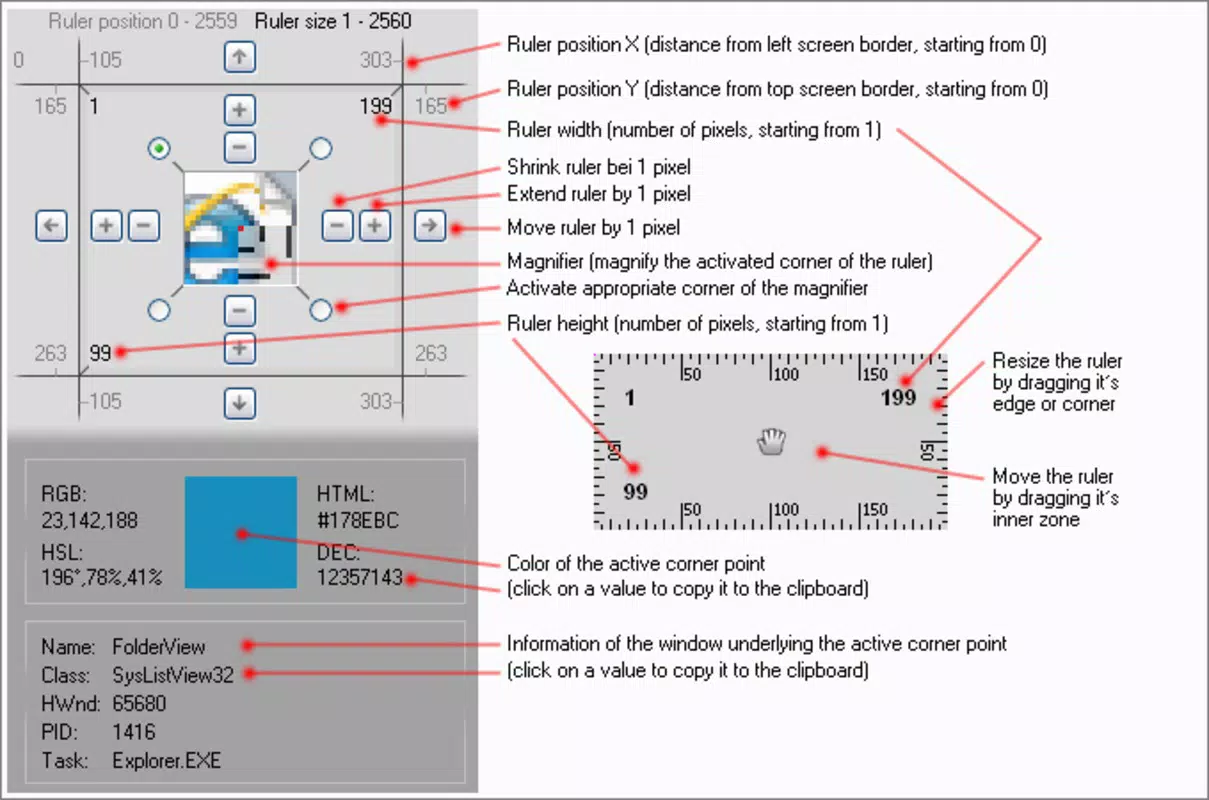
- Semi-Transparent Design: The ruler appears with a translucent layer, allowing users to view content beneath it clearly. This is especially beneficial when measuring elements in layered designs or complex layouts.
- Customizable Size: Users can adjust the ruler’s length and scale using keyboard shortcuts, enabling flexibility across different screen sizes and measurement needs.
- Accurate Movement: The ruler can be repositioned with fine control using arrow keys, allowing for exact alignment with screen elements, such as margins, borders, or spacing.
- Virtual Magnifying Glass: This feature magnifies the area around the measurement point, improving accuracy when dealing with small or intricate details.
- Lightweight and Fast: The app launches almost instantly and operates with minimal system resource usage, making it suitable for long-term use without performance impact.
For example, a designer can use the magnifying glass to align a pixel-perfect border on a mobile UI mockup, while a student might use the ruler to measure spacing between text lines in a digital document. The ability to scale and move the ruler with precision supports a wide range of practical applications, from creative work to academic tasks. These features collectively contribute to a seamless, efficient measuring experience, positioning Screen Ruler 2D as a valuable tool in digital workflows.
Interface, UX & Performance
The interface of Screen Ruler 2D is minimalistic and focused on functionality, prioritizing ease of use over visual flair. The ruler appears as a clean, semi-transparent overlay with clearly marked units, ensuring readability without distraction. Navigation is intuitive, relying on standard keyboard inputs for movement and scaling, which reduces the learning curve for new users. The layout is consistent across different screen sizes, maintaining usability on both tablets and smartphones.
Although the developer did not list formal performance metrics, the app is described as lightweight and fast, opening almost instantly and operating smoothly without noticeable lag. Users can expect consistent responsiveness during prolonged use, with no reported crashes or freezes. The app’s resource efficiency suggests it runs well on a variety of devices, including those with limited processing power.
Stability appears to be a strength, as the tool maintains its position and settings across sessions. The absence of intrusive ads or pop-ups further enhances the user experience. Overall, the UX is optimized for quick access and uninterrupted workflow, making it ideal for users who value speed and reliability in their digital tools.
Platform Compatibility & Technical Requirements
Screen Ruler 2D is available on Android and iOS platforms, supporting a broad range of mobile devices. The app’s file size is 1.2 MB, indicating a compact footprint and efficient code structure. This small size contributes to fast download and installation times, ideal for users with limited storage or slower internet connections.
The software version is not specified in the provided data, nor are the minimum OS requirements. The developer did not specify minimum OS requirements or compatibility details for older device models. However, given its lightweight nature and long-standing release since 2016, it is likely compatible with a wide range of current and legacy systems.
Pros and Cons
Pros
- Lightweight and fast to launch, minimizing system load.
- Semi-transparent design enhances visibility of underlying content.
- Customizable size allows flexibility for various measurement tasks.
- Accurate positioning with arrow key control for precise alignment.
- Includes a virtual magnifying glass for detailed measurements.
Cons
- Specific technical requirements were not listed.
- Developer background and company details were not disclosed.
- Platform availability beyond Android and iOS was not confirmed.
- No information on update frequency or future development plans.
- Keyboard shortcuts may be less accessible on some mobile devices.
FAQ
Is Screen Ruler 2D free to download?
Yes, the app is available for free download on both Android and iOS platforms.
Can I use Screen Ruler 2D on my tablet?
Yes, the app is compatible with tablets as long as they run Android or iOS.
Does the app require internet access?
No, Screen Ruler 2D operates offline and does not require an internet connection to function.
Is the app secure to install?
Yes, the app is designed as a lightweight utility with no known security risks. It does not collect user data or permissions beyond basic system access.
How often is the app updated?
The update frequency was not specified by the developer.
Final Thoughts
Screen Ruler 2D stands out as a reliable, no-frills tool for anyone needing accurate on-screen measurements. Its combination of a semi-transparent design, customizable size, and precise movement makes it highly effective for both creative professionals and casual users. The inclusion of a virtual magnifying glass adds a valuable layer of accuracy, especially for detailed work.
Despite limited public information about the developer or update schedule, the app’s consistent performance and lightweight design speak to its stability and efficiency. It fills a niche in the mobile productivity space with a focused, user-centered approach. For designers, students, and digital content creators, it offers a practical alternative to physical rulers.
Its fast launch time and minimal resource usage ensure it remains a dependable companion across long work sessions. Download Screen Ruler 2D now.


